Showing posts with label seo. Show all posts
Google's Latest SEO Book To Optimize your Blogs
Now a Days Google's latest cheat sheet ebook has become very popular among bloggers.Whether you are a new comer or you already have a blog, Google always helps you . At the Google Webmaster Central blog, you will find any number of news, tutorials, tips, and best practices involved with webmastering. Google has released many items related to Search Engine Optimization. Google has released an ebook some time ago which contains all the basic SEO tips you want.
Now, for starters, Google has released a new one-page quick-start eBook which captures the essence of SEO as it is used today.
Dubbed as a 'first steps cheat sheet' by Google, this eBook is specifically designed for people who have set up a blog or an online presence, but haven't given much thought to search. They might have made some content, but don't know the ABC of getting their website into Google Search.
This book is a very short and concise guide on search engine optimization, with tips on how to create SEO friendly design, This will help search engines like Google itself to better understand the content on your site, and hence will increase its visibility.
Take a look at this amazing one-page SEO eBook here.
.png)
Now, for starters, Google has released a new one-page quick-start eBook which captures the essence of SEO as it is used today.
Dubbed as a 'first steps cheat sheet' by Google, this eBook is specifically designed for people who have set up a blog or an online presence, but haven't given much thought to search. They might have made some content, but don't know the ABC of getting their website into Google Search.
This book is a very short and concise guide on search engine optimization, with tips on how to create SEO friendly design, This will help search engines like Google itself to better understand the content on your site, and hence will increase its visibility.
Take a look at this amazing one-page SEO eBook here.
.png)
How to download this eBook?
Here's the direct download link to this eBook;
Download: Google One Page SEO Guide
If you're more of an advanced user, we something for you too! You can check out the more extensive Google SEO Starter Guide that will detail you through most of the basic SEO aspects.
This eBook is free to use, and you can distribute or print it as you like! Give it a read, and share the knowledge with others too and increase awareness! All the best :)
Blogger SEO has Made Easy with New Search Preference Option
Good News For All Bloggers!. Blogger has Introduced a New “Search Preferences” Option. This is Really a Great Option for blogs on Blogger Platform. Blogger added the Meta Tags, Customize Robots.txt, Redirects, Customize 404 Error Page option, Alt tags for Images.
SEO is a major part in any Website or Blog. Before Blogger had not Supported SEO. But now on Blogger SEO is Fully Functional and Dynamic. You can set the Meta Description for Each Single Post and Robots Tags separately.
1.BLOGGER ADDED THE FOLLOWING OPTIONS
1.Search Meta Description
2.Custom Post Meta Description
3.Custom 404 Error Page
4.Redirects
5.Custom Robots.txt
6.Custom Robots Header Tags
7.Alt and Title tags for Images
2.ENABLE THE SEARCH PREFERENCE OPTION
This option is only Available in New Blogger UI Dashboard. to Enable the Options
Go to New Blogger Dashboard > Select the Blog
Select the Settings Tab > Search Preference

SEARCH DESCRIPTION
This is the General Description for Home Page to Optimize Home page/Blog and this Description is Visible on Search Results of Home page.
Search Description Should be a Short Description about your Blog and Max 150 Characters in Length.

CUSTOM POST META DESCRIPTION
This is the Custom Post Meta Description for Each and Every Individual Post. You can Set and Customize the Each Post Description While Creating or Editing the post area.
Under the Post Settings(on Right side of Creating/Editing Post) Click the Search Description. Enter the Small Description about your Post. Looks like there is No Limits to the Description. But Google Will Crawl Around 160+ Characters only. So Keep your Post Description as Short as possible.

CUSTOM 404 ERROR PAGE
Bye bye!! Blogger Default Error/404 Not Found Page
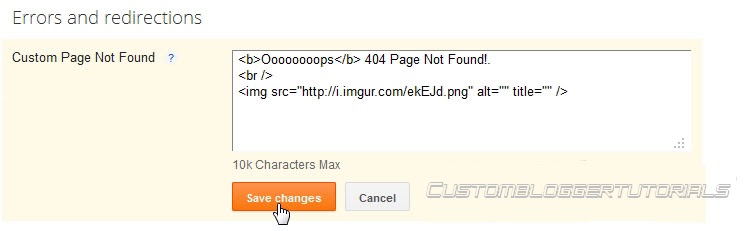
Blogger Providing the Custom Error/404 Not Found Page. This Error/404 message is Usually Visible in Blogger Status Message Bar.
You can add Custom Error/404 message with HTML tags or Even Images Also
REDIRECTS
This is also A Great New Option in Blogger.
To Redirect a One Page form Another Page, You can use this Option and Redirect easily.
The Redirection is 302 Temporary Redirection and Redirection is sent through HTTP Headers.

____________________________________________________________________________________________________________________________________________________________________________________________________________________________________________________________________________________________________________________________________
__________________________________
__________________________________
5 Effective Ways to Build Organic Backlinks
Here are 5 Effective Ways to Built organic backlinks quickly. Apart from writing quality content and promoting it through social media, it’s necessary to have some quality backlinks to your blog. After the recent search algorithm changes by Google, many blogs are punished for several reasons. To stay safe and ahead of your competitors, it’s necessary to take some action and building organic backlinks will surely help.
This article is written after getting inspired from a video by Matt Cutts, the head of Google SPAM Team. He clearly mentioned some good points on how to build organic backlinks.
WHAT ARE ORGANIC BACKLINKS ?
There are thousands of ways to build links to your blog and none of them are equal to “Organic Backlinks”. In simple words, organic backlinks can be explained as the links that are naturally constructed, which usually happens when you focus on high quality and unique content.
HOW TO BUILT ORGANIC BACKLINKS ?
Here are 5+ sure fire tips that help to built organic backlinks to your blog.
1. CONTROVERSIES
Indulging in a Controversy will easily highlight things mostly if you are on the negative side. You need to follow-up regularly and have to be in touch with trending topics. Words have such a great power and believe me, with a single blog post you can grab the attention of the whole media. Play it safe or otherwise you may face some legal issues
2. EXPERIMENTS
Experimenting on things will depend on your interest and passion to achieve something. Not everyone can do experiments as it needs lot of time and patience. So, if you are goot at something, then try to experiment on things and publish posts like How-to guides on your blog. This is how unique content can be built and organic backlinks will flow to your article, sometimes for years.
3. FREEBIES
Using a feebie to get subscribers and backlinks is an old yet powerful strategy. You cannot get backlinks immediately, but over time you can get some quality backlinks. This depends on the quality and type of freebie you are providing. If its a regular one, like a free PSD template or a free theme then there wont be much use. Try to work on creative things and give them away for free.
4. COMMUNITIES
Lets consider some blogs in the WordPress niche. There are quite popular and useful blogs on WordPress that help to make the most out of your WordPress blog. Whenever they write an article or list out some resources, links to the articles on other blogs will be included. This purely depends on the author of the article and so its necessary to establish some connections with fellow bloggers.
5. VIDEO BLOGGING
Many have the talent to create useful videos yet don’t try it. Consistent exposure can be gained through video blogging and if you need a sort of inspiration to start with, then you can check TheNewBoston (http://thenewboston.org/tutorials.php). That guy got good programming skills and he is sharing some knowledge through his videos. Make videos and your articles will be linked on many blogs.
BONUS TIP
Forum Participation also helps to get some backlinks. All you have to do is help others by providing some useful answers for questions in sections you have knowledge on. And important thing is don’t SPAM posts with single word answers, it may result in a ban.
OVER TO YOU
That’s it from my side and if I have missed any important one, let me know through comments. If you don’t agree with any of these methods or want some proofs on how they work, lets start the discussion now.
HOW TO BUILT ORGANIC BACKLINKS ?
Here are 5+ sure fire tips that help to built organic backlinks to your blog.
1. CONTROVERSIES
Indulging in a Controversy will easily highlight things mostly if you are on the negative side. You need to follow-up regularly and have to be in touch with trending topics. Words have such a great power and believe me, with a single blog post you can grab the attention of the whole media. Play it safe or otherwise you may face some legal issues
2. EXPERIMENTS
Experimenting on things will depend on your interest and passion to achieve something. Not everyone can do experiments as it needs lot of time and patience. So, if you are goot at something, then try to experiment on things and publish posts like How-to guides on your blog. This is how unique content can be built and organic backlinks will flow to your article, sometimes for years.
3. FREEBIES
Using a feebie to get subscribers and backlinks is an old yet powerful strategy. You cannot get backlinks immediately, but over time you can get some quality backlinks. This depends on the quality and type of freebie you are providing. If its a regular one, like a free PSD template or a free theme then there wont be much use. Try to work on creative things and give them away for free.
4. COMMUNITIES
Lets consider some blogs in the WordPress niche. There are quite popular and useful blogs on WordPress that help to make the most out of your WordPress blog. Whenever they write an article or list out some resources, links to the articles on other blogs will be included. This purely depends on the author of the article and so its necessary to establish some connections with fellow bloggers.
5. VIDEO BLOGGING
Many have the talent to create useful videos yet don’t try it. Consistent exposure can be gained through video blogging and if you need a sort of inspiration to start with, then you can check TheNewBoston (http://thenewboston.org/tutorials.php). That guy got good programming skills and he is sharing some knowledge through his videos. Make videos and your articles will be linked on many blogs.
BONUS TIP
Forum Participation also helps to get some backlinks. All you have to do is help others by providing some useful answers for questions in sections you have knowledge on. And important thing is don’t SPAM posts with single word answers, it may result in a ban.
OVER TO YOU
That’s it from my side and if I have missed any important one, let me know through comments. If you don’t agree with any of these methods or want some proofs on how they work, lets start the discussion now.
Optimize Your Blog Post Titles for Better SEO
If you are also using a template from Blogger then you need to make some changes on it to fit your needs and also to fit the search engine needs. Normally search engine don’t focus on the markup importantly but it’s a good thing to change it to something user friendly. What Blogger templates like ‘Simple’, Travel’ etc. have h1 tag as it’s Blog title, which is normal. But the Post title is not okay that all, it is in an h3 tag, for many reasons your blog might not being shown up in the search results and this is on of those reasons.
You won’t find any difficulties with a WordPress theme, as they are freshly published and reviewed by experts but templates in Blogger were made by expert but not freshly launched. Just as the search engines detects an anchor link because of it’s markup then why can’t they see what heading is being used for what area.
OPTIMIZE THE POST TITLE TO HEADING2 IN BLOGGER
Enough about it’s effect, let’s talk about how to make the changes applicable. These easy instruction will give you the easiest way to turn your post title to h2 from h3.
1.First of all login to your Blogger Dashboard
2.Go to the Template tab and click on Edit HTML, ignore the warning and proceed.
3.Check mark the ‘Expand Widget Template’
4.Use CTRL+F and search for this line
<h3 class='post-title entry-title' itemprop='name'>
5.All you have to do is just change the <h3> to <h2>, change of only a number. But we aren’t done yet, remember there’s still an ending/closing tag. You have to change both starting <h3> and ending </h3> tag into the template. In the middle it’s all XML codes that works on the server to serve an HTML page.

After you turn the starting h3 to h2, do remember to change the ending tag too or it will create difficulties while saving the template.
6.You will find the tag two times. one is for Desktop Version Template and another is for Mobile version Template. I recommend you to change all h3 that marks as the post title to h2. Searching for <h3 will bring up the codes but as i already said, remember to change corresponding closing tag too.
Yeah that’s it ! It doesn’t only increase visibility and beauty of your blog in search results but also make your blog user friendly. Now stop using h3 for your post title, h3 is only good in the post body for heading. This was not a big change or addition for better SEO in your blog but remember it is how SEO works, there’s no easy and direct way to get to the top of search results, small and effective actions you take regarding your blog makes it a hit on SEO and search engines.
Don’t get worried if your blog don’t do too good in the search results, keep posting and that’s the most important aspect in getting to the top. And this blog is always free to read, check post related to Blogger SEO for some more amazing post and do subscribe for our coming posts.
Tag :
bloggertips,
seo
How to Help Google Webmasters Know if your Site is Hacked?

As I have been saying in my previous posts, Google is smart enough to keep a track of everything, all the time and hence according to the new policies, the site that would be detected as a “hacked website” would be displayed with a warning message “This Site may be compromised”. This has been done to ensure safety of the users who might find the affected site in the search results and find themselves been overloaded with the malicious content.
What makes this news worthy to read is the fact that as a blogger, it is important for you to find whether your blog/website is at risk or not, because in case, it is, then there are wide chances that your website becomes a source to distribute the malicious content among your devoted readers. Moreover, when Google realizes that your site is compromising to facilitate the distribution of malwares, even your site would be having a warning indication in the Google search, affecting your page ranks and your earnings terribly. Therefore, Google has advised all the webmasters to verify their site in Webmaster Tools. Although there are some specific tips for preventing and removing malware from your site, it is still better to be on a safer side to avoid going through a bad phase in business.
A disease can be cured only if you predict it right; however, a dilemma here is that most of the Webmasters do not actually realize when their sites have been infected with the injected malwares. To overcome this, there are two common ways that can help in letting you know that there are malicious third- parties on your website. Let us first see these two ways and then we will talk about how to get your site cleaned from this unwanted mess.
1) Injected Content

Solution:
Making it easier for you, Google will diagnose all the sites for such injected content, and if your site is one of them, you will receive an e-mail about the notification of this detection. If you would find the content risky, you can then use Fetch as Google tool to check the content of your site.
2) Redirecting Users
There would be hardly anyone who would like to be redirected every time when he visits a site. A good way to hack a site is to redirect its users to malicious sites. This is what the users really hate and might never return to your site in fear of getting redirected again to spammy sites. Again, this can be done in several ways where the hacker might target the viewers who access your site through their mobiles or those who are coming from search engines. It was interesting to find that what actually hackers do. They actually modify the configuration files and serve different users with different contents.
Apart from this, such a hacking can also be done by injecting JavaScript into the source code of your site.
Solution:
In order to avoid this, you need to keep a track of your server configuration files for such modifications. For the malicious behavior due to the JavaScript injection, the JavaScript may be designed to hide its purpose, helping terms look like, for example, “eval”, “decode” and “escape”.
Cleanup your site and prevent hacking!
With the two common ways stated above, you can get to know whether your site is compromised or not. If you find your site in risk, then it is necessary to clean it up from the changes that the malwares have brought with them, also preventing your site from getting hacked in future again. You can clean up your site by following the instructions given by Google and prevent such compromises too.
However, you need to consider the sensitivity of the matter and must contact the Google team, informing about your site been compromised. For that you need to submit a reconsideration request after you clean up your site. This is important so that Google can then remove its warning label (indicating you as a compromised site) from its search results.
With that, the post comes to an end, We hope that nothing happens to the sites of our readers, because once affected, it really can bring disastrous outcomes.
Best Wishes,
.jpg)

.jpg)